Blog Post 5

For this project, I created a simple animation in Adobe Animate. I chose to animate a space ship because I like the green and blue effect plus I thought it would be fun to bring it to life. I used frame-by-frame animation to make the space ship hoover.

After finishing the animation, I exported it as a GIF using File → Export → Export Animated GIF. I also saved my Animate (FLA) file, which shows all the layers and frames I used to make the animation. This project helped me understand how motion works in animation and how each frame builds movement.

Published
Categorized as Animation

Animation final

Christmas in China

Fall 2025

Adobe Animate

Santa Claus went to China and saw Chinese people happily celebrating their own Christmas.

Published
Categorized as Animation

Animation Draft

For my animation draft, I used tweens and stars. I wanted to show the progression of stars throughout the nighttime to daytime. I used colored stars to make my video pop a little and I had the stars come into the screen slowly as it turned from nighttime to daytime. Usually, stars come out at night and rarely during day, so to switch it up a little, I had stars showing up during the daytime.

Blog 6

For this assignment, I created a bouncing ball animation draft using Adobe Animate.
This draft focuses on basic animation principles such as timing, spacing, and motion.
I plan to refine the timing and smooth the motion in the final version.

Published
Categorized as Animation

Animation final

SOS

Fall 2025

Adobe Animate

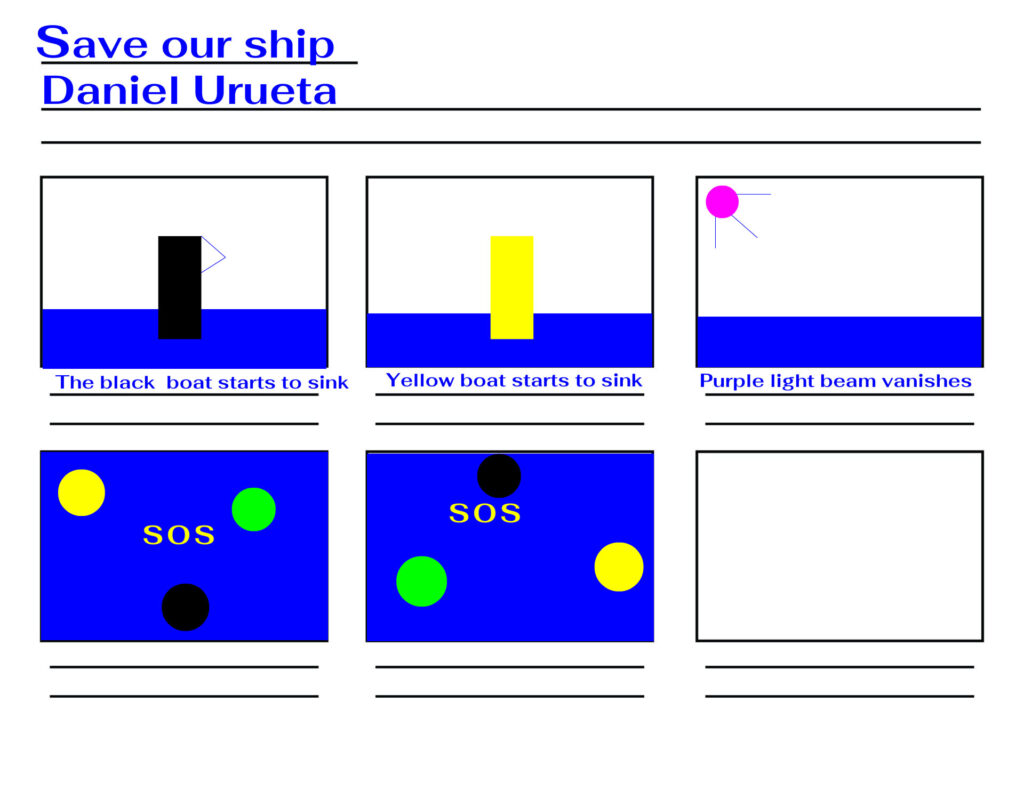
For my project, I decided to animate an SOS message to create an example of an emergency broadcast message. I decided to create this example by trying to replicate a situation in which an SOS message would be used. In my storyboard, I added two boats that surfaced in the ocean and later on would be hit by a portal with beams that appeared in the sky. This would result in both boats sinking and the portal disappearing.

Published
Categorized as Animation

Animated GIF

For my animated GIF, I decided to do an illusion of some sort. I wanted to give the visual of someone juggling balls. As you can see, the balls are moving around each other in a circle. I used the frame-by-frame animation and the loop button. I used bright and bold colors to give off a kind of playful and kiddy vibe.

Animation Draft

For my animation draft I used three oval tools to create rotating ball shapes that move in three different directions. I also used a SOS text that gradually shifts and moves throughout the animation.