Week 4 – Workshop I

15 posts

Week 4 – Workshop I

Take a photo of your map, write a short description (which app did you select and why)  and post a link to your work on Open Lab. * Use the title format “[FirstName] [LastName] workshop III ” and select the Category “Week 5 – Workshop III”

Sharon Lugo- Workshop I

I chose Pinterest as it’s a website that has a really comfortable and easily navigable interface, along with being a website I’ve used for years. I decided to translate my paper sketch into Figma and create a lo-fi prototyped version of my sketch since it’s been months since I’ve used the program and wanted to try and get back into it. I tried to include more zoomed in screenshots for readability.

Samantha Ortiz – Workshop I

I decided on using the Dunkin mobile app for my user flow because I use the app almost daily for my morning coffee. I also decided on this app because the app is well-designed and the UI journey is straightforward. The app has a lot of user flow journeys depending on what you may order, like iced drinks, hot drinks, and all the food options offered. The screens below show the process of signing in, starting a typical mobile order, selecting an iced coffee and checking out.

This sketch is just one of the many flows as there are hundreds on this app.

India Francis – Workshop I

I chose to make a user flow of Letterboxd because I love to watch movies and appreciate the craftsmanship behind each one. My user flow shows the difference between when you’re not logged in versus after you log in. Like any other app, many features are hidden before you make an account, but when you open Letterboxd without an account, it takes you straight to the list of current popular films and give you the ability to read users reviews. I’m sure it’s for people who want quick access to view a movie they’re not sure if they should buy a ticket or not…

Wiktoria Popek- workshop I

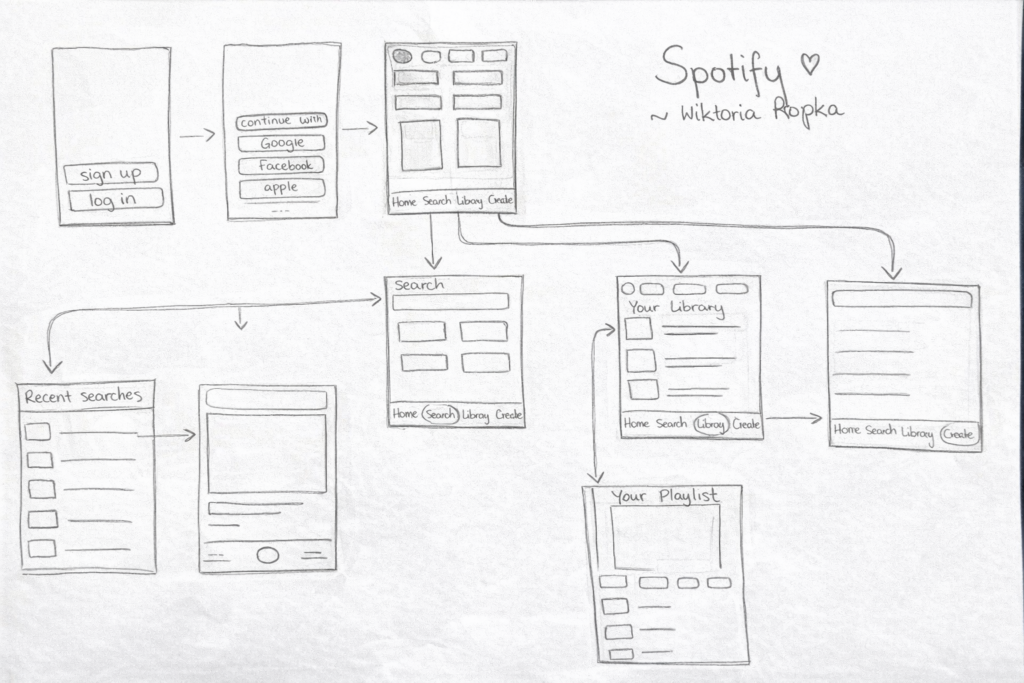
I selected my favorite app, Spotify. I think it is an easy-to-use and very intuitive application. My user flow shows the login process and the transition from the home screen to searching for artists, browsing the user’s library, and creating new playlists. This flow presents the main functions that the application offers to its users.

Marta Senchuk – Workshop III

I chose the Threads app because it is a simple social media platform where people share short posts, reply to others, and interact through likes and comments. Many users already understand how social media works, so it is easy to imagine the user flow. Threads also has several clear screens, like creating a post, viewing replies, profile, and notifications, which makes it a good example for mapping interactions.

Mariia Yanovska workshop |

I selected the Pinterest app because it is a popular platform for discovering and saving ideas. My user flow shows how a user logs into the app, browses the home feed, searches for inspiration, opens a pin, saves it to a board, and can create a board. This flow demonstrates the basic way users interact with the app to organize ideas.